Methodology · the loop, named

How ASOLOOP runs your loop — and how you check it.

You don't run ASO by hand — ASOLOOP runs the loop; your job is to check it. Below: the five-step loop it runs across both stores, then the governance spine that makes letting it act safe. Every step has a receipt; every action has an undo path.

5
steps in the loop
2
stores, end to end
18
reasoning surfaces
14days
revert window

How it runs

The loop it runs, step by step

Propose → generate → launch → apply the winner → learn — across both stores, in your storefront’s language: App Store winners and Google Play SLE winners apply live; CSL winners stage for your publish. You grant how much it does on its own; you can check, edit, or revert any move.

  1. 1

    Propose

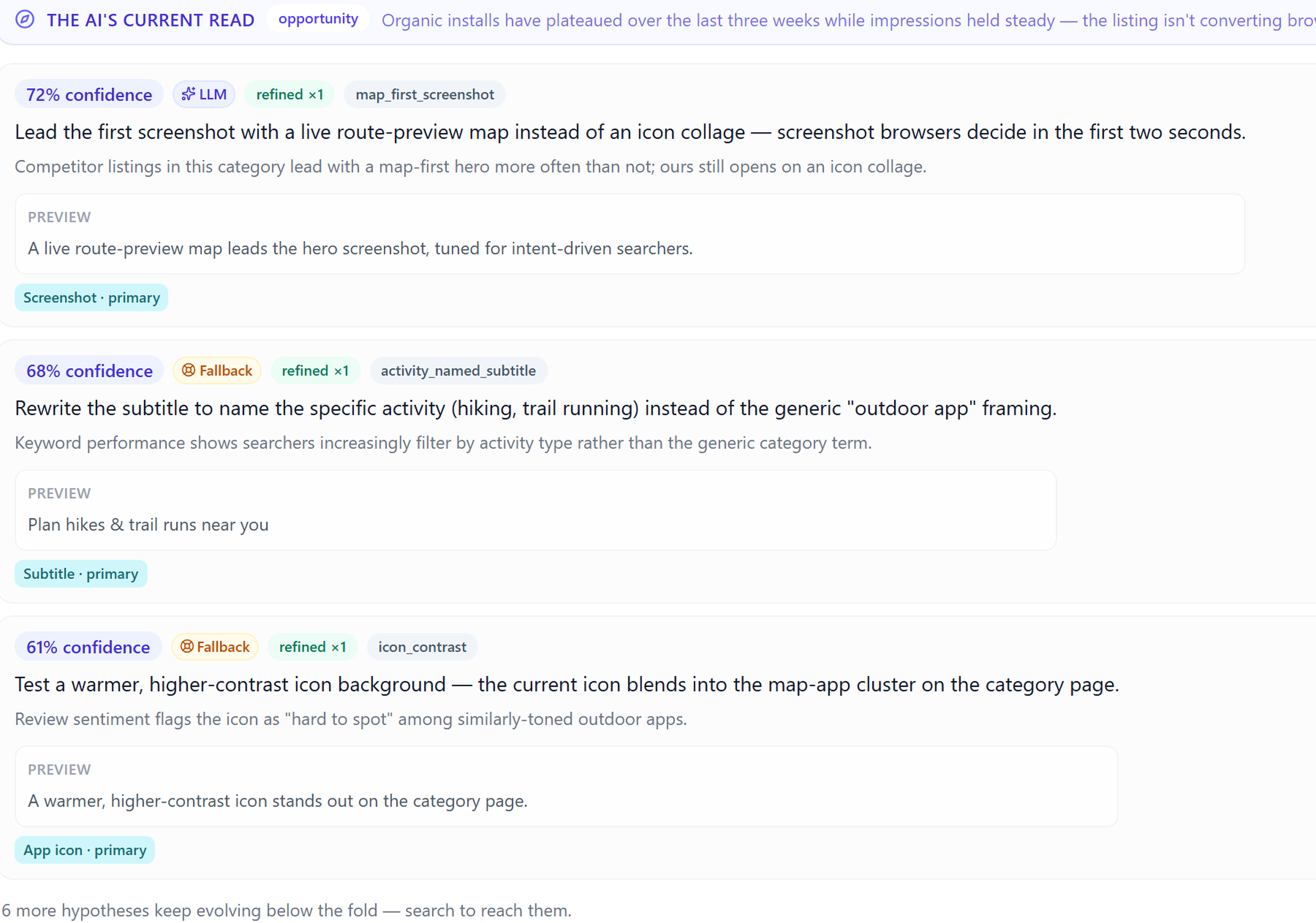
    ASOLOOP's AI reads your per-app signal graph — store data, your keyword tools, the MMP, every past experiment — and proposes what to test next across both the App Store and Google Play: ranked hypotheses, each with a signal-trace rationale. This is the step other tools leave to you.

    ASOLOOP AI hypothesis pool — ranked propositions with confidence and rationale (illustrative data)
    Shipped UI · /evidence/hypotheses · illustrative data
    Thought through 6 signals
    • Store listing & screenshots · store data
    • Keyword rank deltas · connected keyword tool
    • ARPU & install-to-paid · MMP
    • Past experiment posteriors · per-app evidence library
    • Category & locale context · store data
    • Prior claim-safety rejections · validator log
  2. 2

    Generate

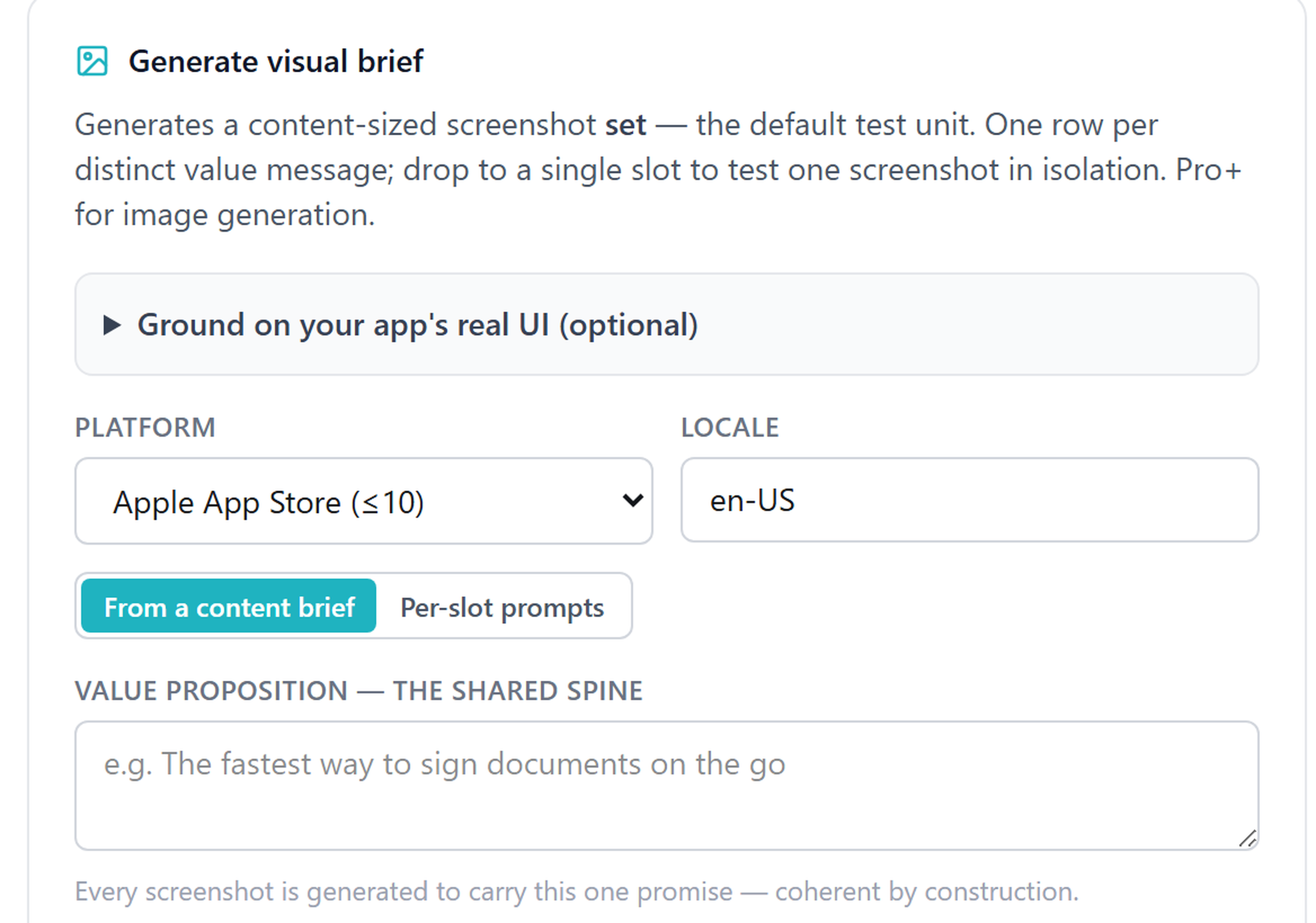
    It drafts the creative — copy and visual briefs — in your storefront's listing language, for both the App Store and Google Play listings, and runs every output through the claim-safety validator before it reaches you.

    ASOLOOP creatives — AI-assisted copy and screenshot generation (illustrative data)
    Shipped UI · /creatives/generate · illustrative data
    Thought through 4 signals
    • Winning-hypothesis brief · Propose step output
    • Claim-safety rule set · validator, per storefront language
    • Brand voice guardrails · Project Rules
    • Locale map · storefront detection, ~30 mapped storefronts
  3. 3

    Launch

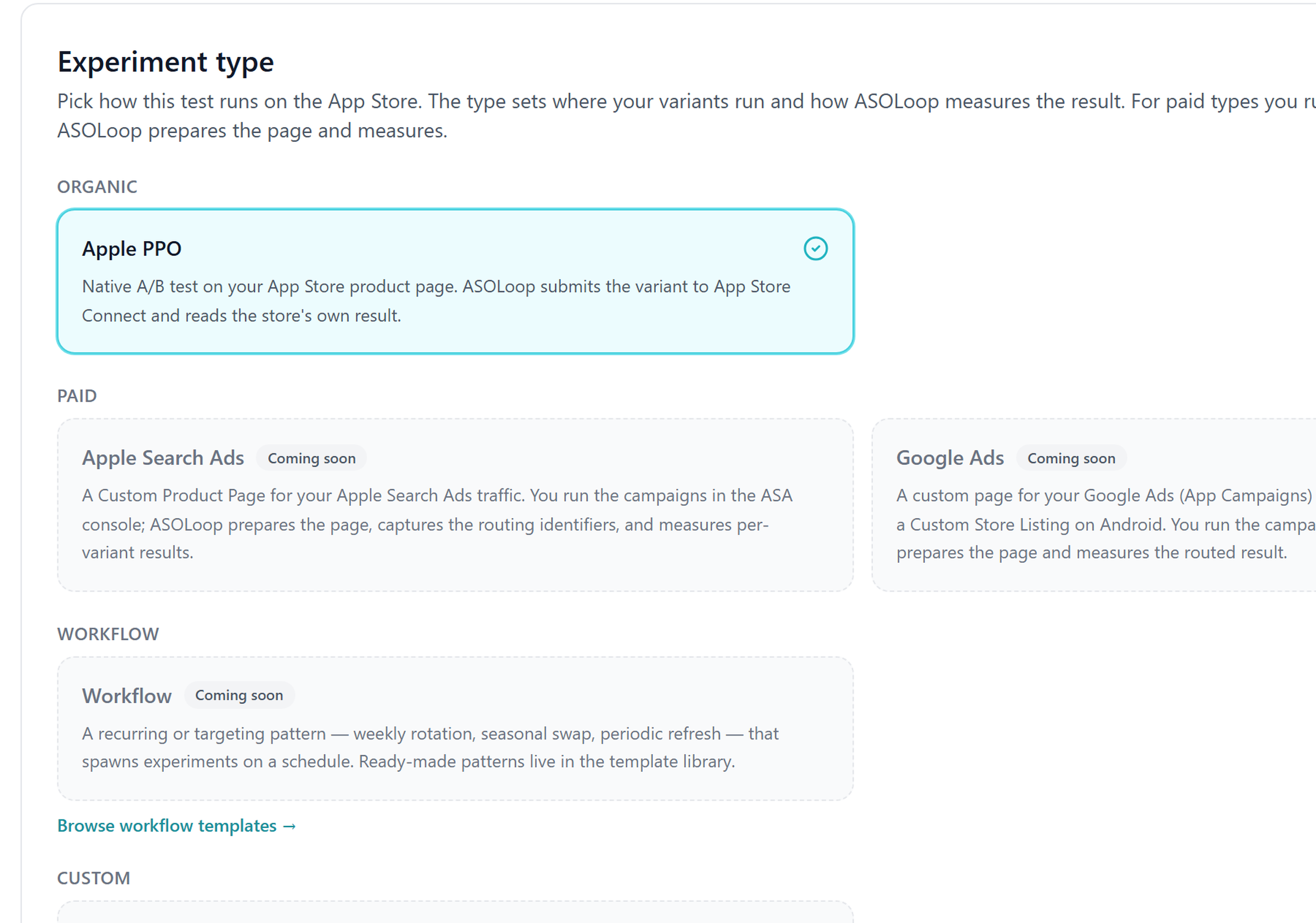
    It launches the test as a native store experiment — PPO or CPP on the App Store, a store listing experiment (SLE, the Android default) on Google Play — or stages a custom store listing for your send-for-review. Both stores, scoped to the storefront locale it detected — PPO, CPP, and SLE end to end; CSL send-for-review staged for you.

    ASOLOOP new-experiment wizard — experiment type picker (illustrative data)
    Shipped UI · /experiments/new · illustrative data
    Thought through 3 signals
    • Experiment-type eligibility · PPO / CPP / SLE / CSL capability
    • Locale scope · detected storefront
    • Traffic allocation · store experiment config
  4. 4

    Apply the winner

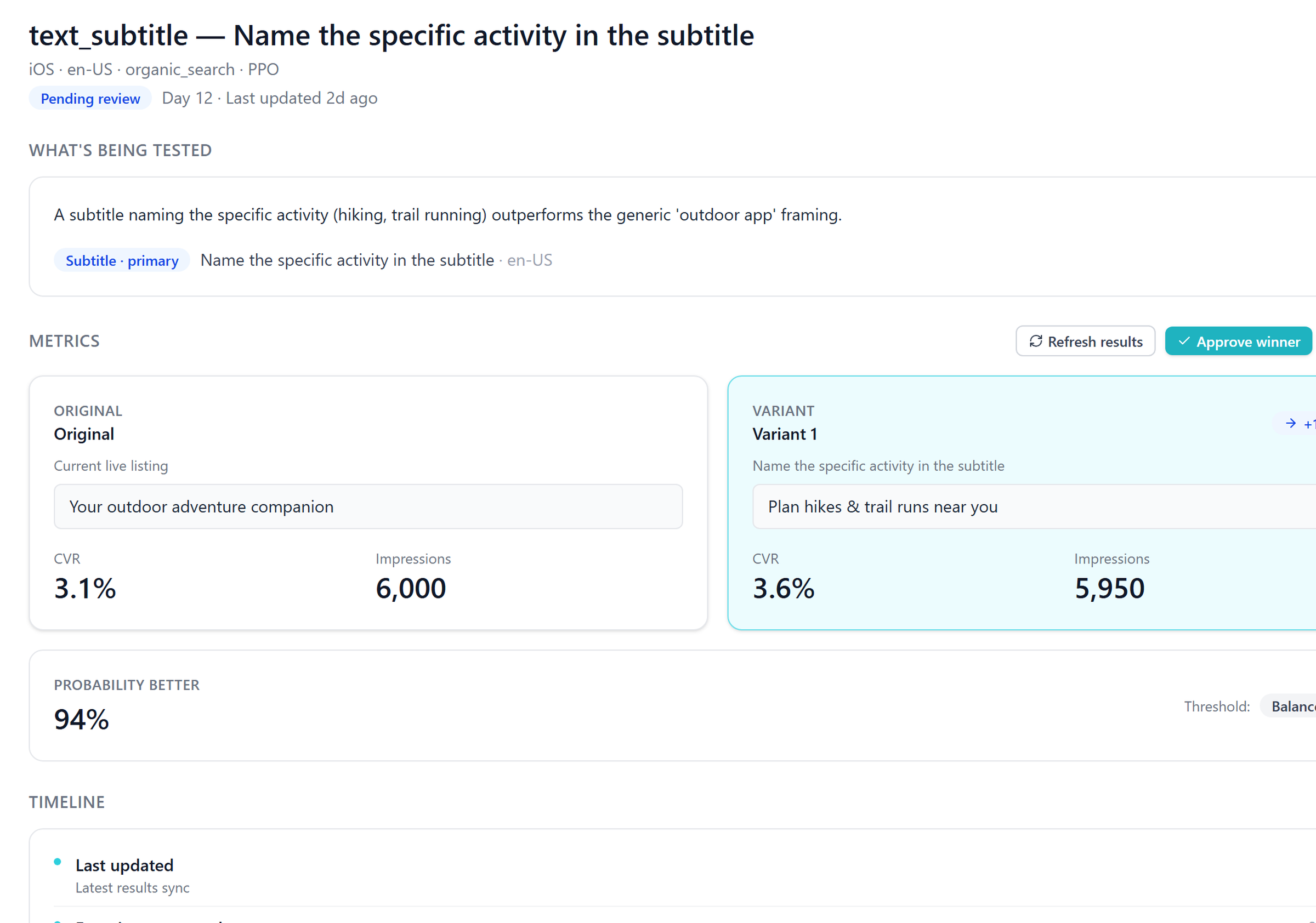
    When a variant wins, ASOLOOP applies it to your live listing — end to end on the App Store and on Google Play store listing experiments (SLE) — and stages the winning CSL treatment ready for your send-for-review. Every other tool stops at a recommendation and hands the doing back to you; ASOLOOP closes the loop. Reversible within 14 days.

    ASOLOOP experiment detail — winner pending approve/reject review (illustrative data)
    Shipped UI · /experiments/active/exp-demo-1 · illustrative data
    Thought through 5 signals
    • Winning posterior · finalized experiment result
    • Live listing diff · both stores' current listing state
    • Precision tier · claim-safety validator
    • Revert affordance state · applied-change version record
    • Operator autonomy setting · Classic / Agent / Autopilot
  5. 5

    Learn

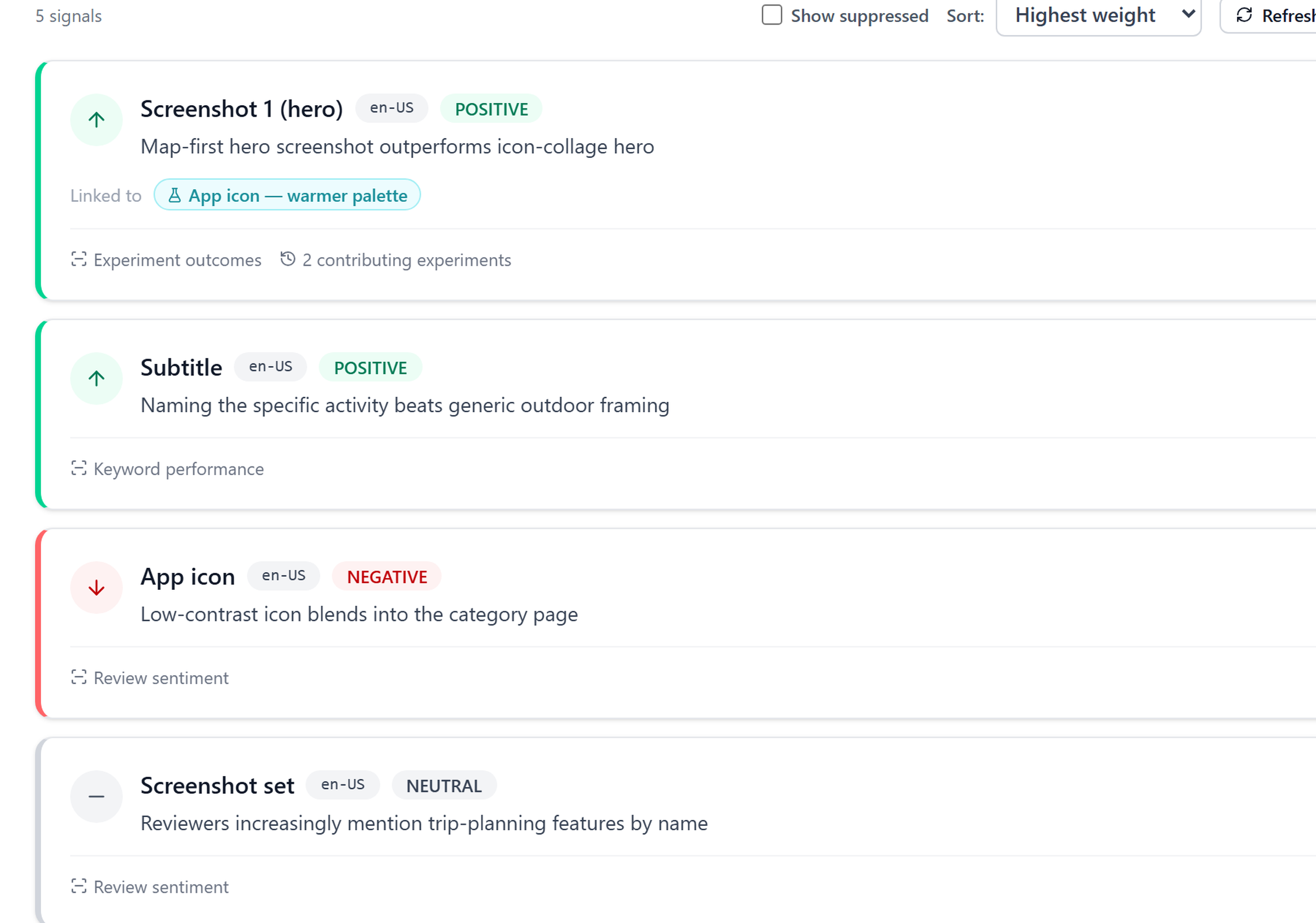
    Every result, from both the App Store and Google Play, writes to the per-app evidence library, so the next cycle starts smarter than the last. The loop compounds.

    ASOLOOP data signals — accumulated evidence across experiments and reviews (illustrative data)
    Shipped UI · /evidence/signals · illustrative data
    Thought through 4 signals
    • Result posterior · this experiment
    • Signal weight update · per-app evidence library
    • Revocation window · 7-day operator review
    • Next-cycle candidate pool · updated evidence library

Reversible · gated · explained · logged

Governed, not blind

You never have to believe, only check. Every action the loop takes on its own carries an undo path, a gate it passed, the evidence behind it, and a log entry — the Linear-Method credibility beat that makes letting it act safe.

Reversible

Every action has an undo path — including AI-autonomous ones.

Revoke a signal within 7 days, suspend a running experiment, roll back an applied winner to the previous live listing within 14 days, or turn Autopilot off effective next cycle. Project Rules edit history is versioned too — rollback is one click, everywhere.

14-day winner revert window

Gated

Nothing renders without passing the claim-safety validator first.

Un-sourced and point-estimate revenue claims are rejected outright; regulated-category claims need an evidence link or a Rights Administrator attestation. The gate runs per storefront language, with a deterministic-template fallback when a draft is rejected.

5 gate rules, every generation

Explained

The model writes the sentence; the data it reasoned from stays in view.

Every LLM-rendered surface keeps its deterministic evidence beside it — source-traced to the experiment that produced it, queryable per app, and revocable within 7 days. You check the claim; you don't just trust it.

18 reasoning surfaces

Logged

Every autonomous move writes to an exportable audit log.

Timestamp, actor, and the signals behind it — recorded for every revocation, suspension, applied winner, and Autopilot change. Nothing is silently dropped.

Exportable audit log

How confidence shapes commitment

The three-mode lifecycle

Many candidates when evidence is thin; fewer when it’s reliable; one when it’s rich enough to act on. Each app sits in one mode at a time.

  1. 1

    Learning

    Cold start

    Candidates per cycle
    3–4 candidates per cycle
    Signal shape
    Wide signal weights, wide posteriors
    When you’re here
    The default for any new app. Progression to Classic is gated on evidence, not on an experiment count: three active signals, signal health at or above 1.5 sigma, and three qualified hypotheses — all three required.

    Posterior shape is unstable; ASOLOOP surfaces multiple candidate directions on every cycle so the operator picks based on judgment, not a borrowed score. Inconclusive PPO/CPP results still write contribution; precision-tier disclosure carries forward.

  2. 2

    Classic

    Signals reliable

    Candidates per cycle
    3–4 candidates with signal-backed rationales
    Signal shape
    Narrower signal weights, narrower posteriors
    When you’re here
    Auto-progression on threshold; operator override available any direction at any time.

    Auto-progresses from Learning once the app clears all three evidence gates — three active signals, signal health at or above 1.5 sigma, and three qualified hypotheses. Experiment outcomes feed those gates as signal rows; there is no experiment count to hit. Each candidate carries a signal-trace rationale; the operator can inspect every contributing experiment.

  3. 3

    Agent

    Signal-rich; commitment

    Candidates per cycle
    1 candidate
    Signal shape
    Tight posterior; high commitment
    When you’re here
    Operator opt-in only. Reversion to Classic is a single click; Agent never traps you.

    Surfaces a single recommendation when accumulated evidence is dense enough to back one candidate over the alternatives. Required precondition for Autopilot. Never auto-promoted from Classic — Agent is always an explicit operator opt-in, with the implication understood.

Auto-progression rules: Learning → Classic fires when all three evidence gates clear (the thresholds are product-set, not per-app dials — what you control is a per-app mode override); Classic → Agentnever auto-fires — Agent is always an explicit operator opt-in. Reversion in either direction is a single click, takes effect on the next cycle.

The gate before anything renders

The claim-safety validator

A mandatory gate that runs before every generative output reaches you. Nothing renders without passing.

  • Un-sourced revenue claims: rejected. Every revenue projection must trace to MMP-derived ARPU + install-to-paid + lifespan inputs; no operator-attested fallback.
  • Point-estimate revenue claims: rejected. Every revenue projection renders as a range with the underlying assumptions disclosed inline.
  • Regulated-category claims without evidence: rejected. Healthtech, fintech, gambling, children’s-app claims require an evidence link or an attestation from the Rights Administrator role (Teams).
  • In-language claim safety:the validator runs per language — pricing-claim and superlative rules are generated and gate-validated for the storefront’s language before first use; outside the ~30 mapped storefronts, generation degrades to guarded prompts plus a review flag, never silently.
  • Deterministic-template fallback: when an LLM output is rejected, ASOLOOP falls back to a deterministic template so the cycle continues; the operator sees both the rejected output and the template with audit context.

The proof stays visible

The evidence trail

Every LLM-rendered surface in ASOLOOPkeeps its deterministic evidence in view — the model writes the sentence, but the data it reasoned from stays visible, source-traced, and revocable. You check the claim; you don’t just trust it.

  • evidence-in-view

    Banners, rationales, hypothesis-card recommendations

    The model renders the sentence; the signals, contributions, and numbers it reasoned from stay visible beside it — never replaced by the prose. The rationale is editable; the recommendation can be revoked.

  • source-traced

    Every signal, every claim

    Each claim traces to the source experiment that produced it. The signals are queryable per app; click into any surface and verify the evidence the model claims to summarize is the evidence in the system.

  • revocable

    Every signal you disagree with

    Suppress or revoke any signal within a 7-day window and it disappears from future rankings. The audit trail keeps the record; nothing is silently dropped.

From posterior to revenue range

Revenue-denominated confidence

CVR posteriors don’t survive a CMO meeting. Revenue ranges do. Today ASOLOOPrenders one workspace-level revenue band, computed from your connected AppsFlyer revenue, on the Teams-tier stakeholder dashboard. Translating each hypothesis’s Bayesian CVR posterior into an expected revenue range from the inputs below, with assumptions disclosed on every projection, is in progress — this is the model it will run.

InputCVR posterior
MMPARPU
MMPInstall-to-paid
MMPLifespan
OutputRevenue range
  • Bayesian CVR posterior

    Native PPO / CPP / SLE / CSL result

    Posterior probability distribution over the conversion-rate delta between treatment and control variants. Inconclusive results render as overlapping distributions; ASOLOOP does not collapse to a point estimate.

  • ARPU

    MMP-derived (AppsFlyer-derived today; Adjust / Branch / Firebase Analytics connectors live)

    Average revenue per user. Operator-MMP-sourced exclusively — no operator-attested fallback per the claim-safety contract.

  • Install-to-paid

    MMP-derived

    Ratio of installs that convert to paying customers within the operator-defined window.

  • Lifespan

    MMP-derived

    Expected duration a paying user stays subscribed or retained, used to project lifetime-value range from a single CVR posterior.

Output will render as ~$X–$Y/month additional revenue at N% probability with the four inputs disclosed inline once the per-hypothesis translation ships. Stakeholder-readable; defensible upward.

The compounding substrate

Per-app evidence library

The substrate that compounds. Every signal ASOLOOPwrites is scoped per app, per audience. No global ASO model. Signals from one Operator’s app do not feed another Operator’s recommendations. Cross-app pattern aggregation is a planned Teams capability under a separate consent surface.

The library is the difference between “we ran four tests” and “we’ve learned four things from those four tests.”

Where to next

See it running on a real app.

The 7-day trial drops you into a workspace where the architecture above is live. Connect an app, log an experiment, watch the evidence library accumulate.